Create and Follow Up on Jobber Quotes With Claude
Claude can run the entire quote lifecycle in Jobber: draft the quote from a plain-English description, structure the line items, log the client conversation, chase the ones that go quiet, and convert approvals into scheduled jobs. It works through your own private Jobber connector, built on MCP, against your real price book.
Updated July 2026
A quote is a pipeline, not a document
Every quote you write is in one of five states: needs writing, waiting on you, waiting on the client, going stale, or won. Most quoting advice obsesses over the first state. The money is usually lost in the middle three.
Here's what each stage looks like when Claude is doing the clicking. We'll follow one quote the whole way through: a mulch and bed-refresh job for a client named Henderson.
Draft it by describing it
“Create a quote for Sarah Henderson: 12 yards of black mulch installed, bed edging refresh on the front and side beds, and haul-away. Use our standard mulch install pricing from the price book.”
Claude pulls the client, builds the quote with real line items from your Jobber price book, applies your pricing, and creates it as a draft. If something's ambiguous (two Hendersons, no edging item in the price book), it asks instead of guessing.
Make it read like you
“Add a text line above the line items: 'Includes premium double-shredded hardwood. Beds will be edged and cleaned before install.' And add an internal note that she mentioned a dog, crew should keep the side gate closed.”
Section headers, descriptions, and client-facing text lines are all fair game, and internal notes land on the quote where your crew will actually see them. The quote that goes out is yours, not a template's.
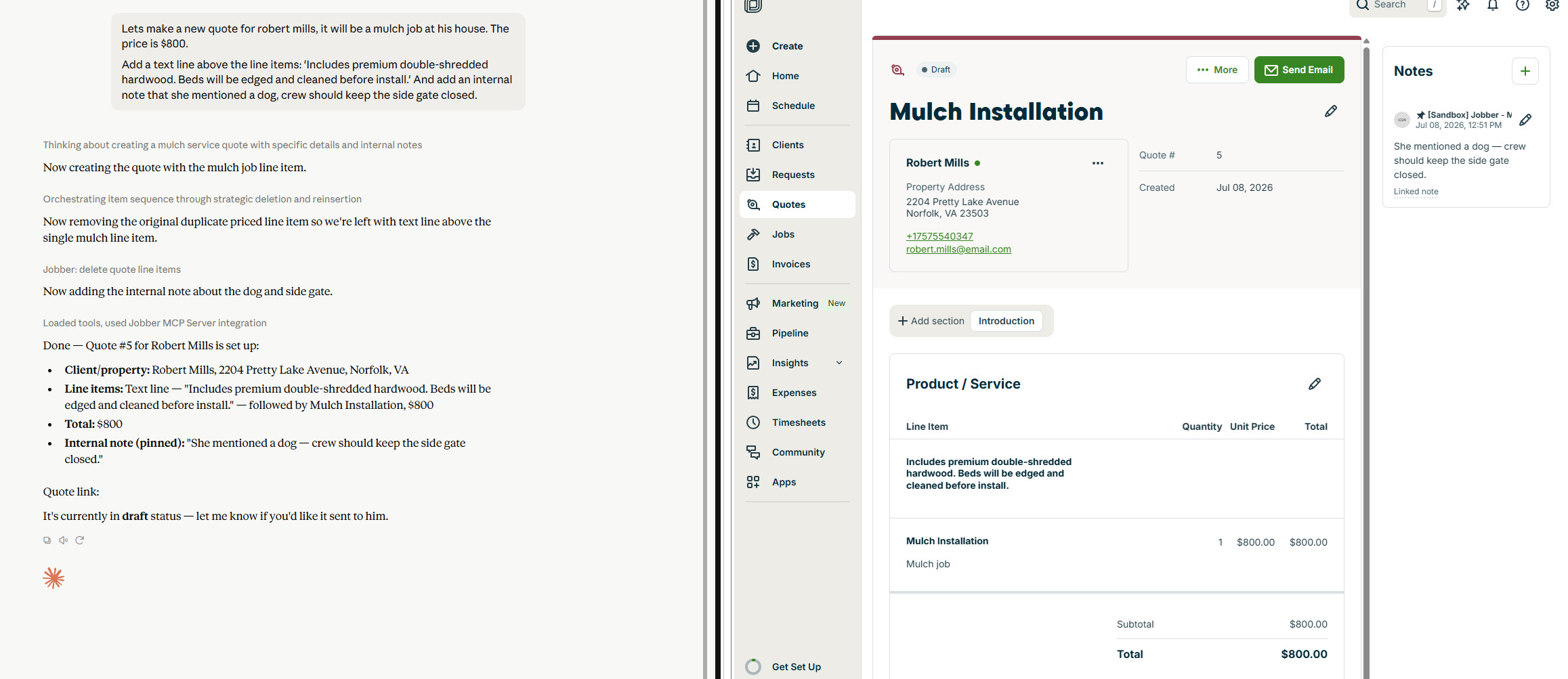
Claude builds the draft in chat; the quote lands in Jobber with your text line, line items, and pinned internal note. Send it from Jobber
Honest detail: the send itself happens in Jobber, where your client-facing email, client hub link, and approval flow already live. Claude preps everything to one click. This is deliberate. The AI assembles; you approve what reaches a client.
Chase the quiet ones
“List every quote that's been awaiting response for more than 7 days, with the client, amount, and how long it's been sitting.”
This is the stage that pays for the subscription. Quotes don't die because clients say no; they die because nobody followed up. Ask weekly and the going-stale pile stops being invisible. Have Claude draft the follow-up text or email for each one while it's at it, ready to paste and send.
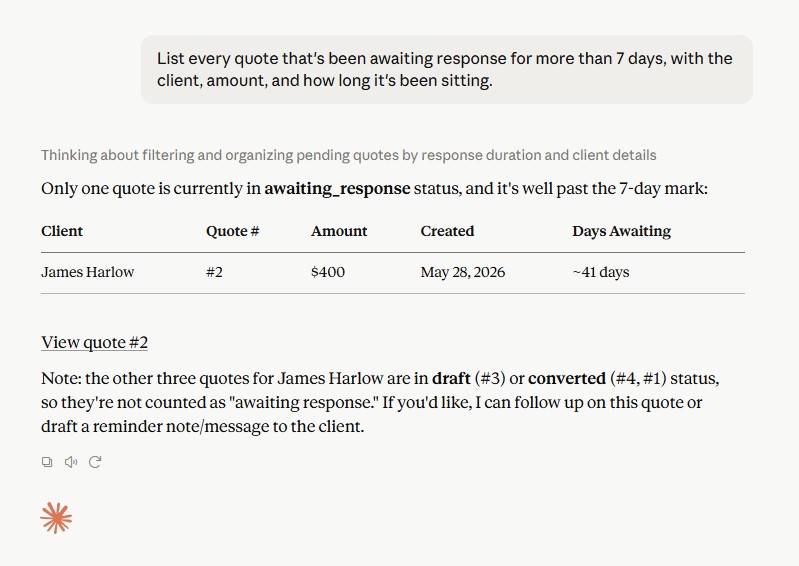
One prompt surfaces quotes sitting in awaiting response, with client, amount, and days waiting. Convert the yes
“The Henderson quote was approved. Convert it to a job and schedule the visit for next Tuesday morning with a two-person crew.”
Quote becomes job, line items carry over, visit lands on the calendar with the crew assigned. The internal note about the dog rides along. From approval to scheduled in one message. From here it's a job, and when it's done, the invoice is one message away.
Where the compounding happens
One quote, this is convenient. Twenty quotes a month, it's a different business. The weekly stale-quote sweep alone typically surfaces two or three deals that were quietly dying, and drafting from the price book means new office staff quote like your best estimator from day one.
Pair the follow-up habit with the uninvoiced work audit and you've closed the two biggest revenue leaks in field service: quotes nobody chased and finished work nobody billed.
Connect once, quote by chat from then on
Setup is about 5 minutes with your own Jobber developer credentials: How to Connect Jobber to Claude. $47/month after a 7-day free trial, private connector, all features.
Frequently asked questions
Does Claude use my actual Jobber pricing?
Yes. It searches your Jobber price book and builds line items from your real products and services. If an item doesn't exist, it tells you rather than inventing a price.
Can it send the quote to my client?
Claude creates and perfects the quote in Jobber; you send it from Jobber, where your client hub and approval flow live. Nothing reaches a client without your click.
Can I add discounts, deposits, or optional line items?
Quotes support your Jobber pricing structures, and Claude can build and edit line items accordingly. Describe the deal the way you'd say it out loud.
What about following up, does Claude email clients directly?
No, and that's by design. Claude finds the stale quotes and drafts the follow-up message; sending stays in your hands, through whatever channel you use.
Can it tell me my quote win rate?
Ask it. Claude can list quotes by status across any period, so "what percentage of last quarter's quotes converted, and what was the average approved amount?" is a one-line question.
Keep going: more ways to run Jobber by chat
Find Unconverted Quotes
Surface approved quotes with no job behind them before the client cools off.
Read guideFind Unanswered Requests
Surface new requests nobody replied to before the lead calls someone else.
Read guideFind Uninvoiced Work
Audit your whole account for finished work that never got billed.
Read guide